
Blog · Web development
Webflow Logic: the no-code game-changer that’s about to make waves

On this page
Discover Webflow Logic, Webflow’s upcoming product that lets you create smart scenarios on your websites!
At the No-Code Conf 2021, a multi-day conference dedicated to no-code innovations, Webflow announced several updates to its CMS: the ability to add paid members to your site for easier SaaS development, a revamped collaboration system with more roles, and improved performance (with the editor now up to 15 times faster and using 86 times less bandwidth!). Needless to say, we were spoiled for choice. But among all these updates, one caught our attention in particular: the announcement of Webflow Logic, an entirely new product Webflow that will let you automate elements of your website. Big news for the no-code world!
What is Webflow Logic?
Webflow Logic was announced in 2021, released in beta, then removed from the product in 2025. What follows describes what was presented at the time; the update below explains what to use today.
Update, August 2026, this article describes a product that no longer exists. On 11 December 2024 Webflow announced the deprecation of Logic and User Accounts. Logic could no longer be activated from 31 January 2025, and the tool was removed for good on 27 June 2025: existing flows are disabled and the forms connected to them reverted to standard Webflow forms. Webflow frames the decision as refocusing on its partner ecosystem rather than native tooling. What follows therefore keeps a historical interest, and a broader lesson about depending on a proprietary feature.
Webflow currently offers several distinct products: a powerful no-code CMS (website editor), Webflow E-commerce which turns any site into an online sales platform, a website hosting service… All these products share one goal: making website creation easier, faster, and more accessible through no-code technology.
This is why Webflow announced Webflow Logic, a tool designed to automate tasks and actions on your website. Using logical reasoning (if/else, yes/no, etc.), Webflow Logic will let you customize the user experience.
With this new tool, Webflow will let you build web applications without writing a single line of code. You’ll no longer need to integrate workflows from Zapier or Integromat into your no-code sites.
What can you do with Webflow Logic?
We still know little about the features Webflow Logic will offer: the tool is still in development and was only just announced. But based on the screenshots shared during the Keynote and on Webflow’s official website, we can make some educated guesses.
Automate without coding
The first thing that stands out is how visual the tool appears to be. This is Webflow’s signature approach, after all. You’ll be able to create automation scenarios without writing a single line of code, just by building blocks, selecting the right triggers, and defining the resulting actions. Webflow Logic stays true to what makes Webflow’s website editor so appealing, and that’s great news for the future of no-code.
Create logical scenarios using conditions
Webflow Logic will enable the development of logical scenarios: starting from a trigger or event, a series of actions can unfold based on predefined conditions.
An example was developed during the Keynote. Today, it’s possible to create a form on Webflow to ask your website visitors for information. This information is then sent either to your CRM or by email so it can be processed and collected.
Thanks to Webflow Logic, you can add certain conditions to pre-process the leads you collect. For example, by adding a "Company Size" field, you can separate leads from SMEs and those from large enterprises. A notable time-saving in processing your prospects.
Once this processing is done, Webflow Logic allows you to add additional blocks, such as sending a thank-you email to the person who contacted you.
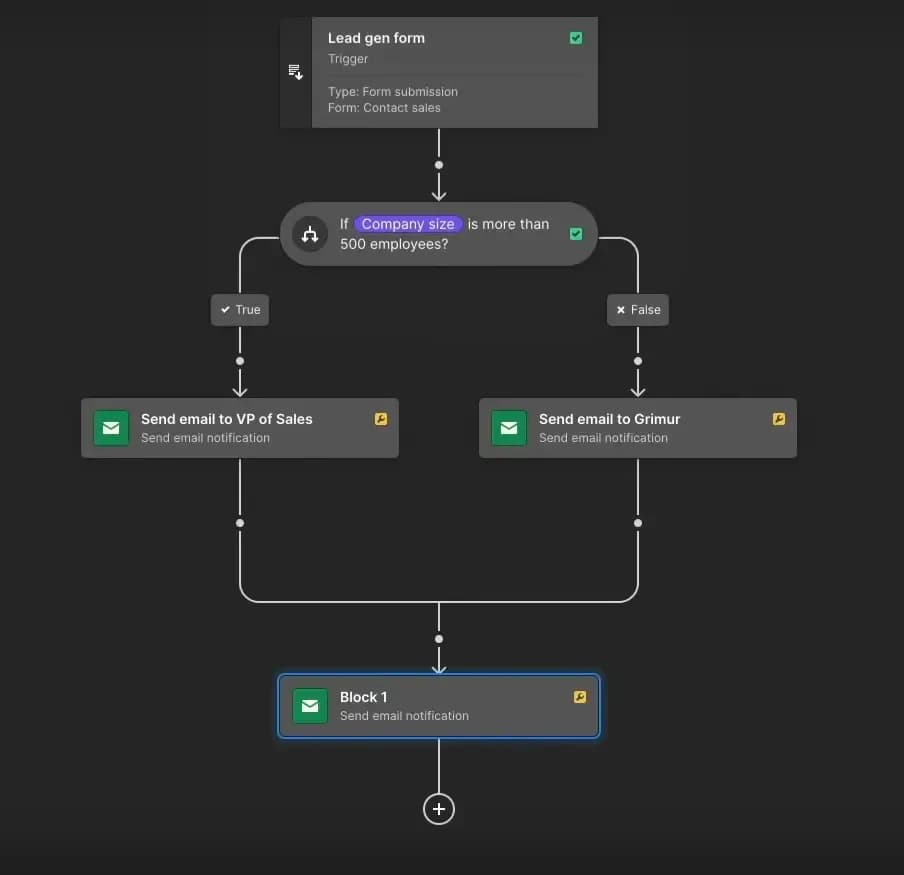
Capture taken during the No-Code Conf 2021 Keynote, showcasing an automation scenario with Webflow Logic.
The logical scenarios created this way can be as complex as you like: Webflow Logic allows you to add a huge number of conditions and blocks to handle all the use cases that interest you.
Create web applications
This is another major new feature and a great strength of Webflow Logic. Historically, to create web applications in Webflow, you had to connect third-party tools like Bubble, Integromat, or Airtable, or hire a developer to code them.
Thanks to Webflow Logic, you can create your own applications while staying within the Webflow ecosystem.
Another example was developed during the Keynote: a job offers website. An employer wants to post a job on your site. They fill out the form with all the necessary information.
Using Webflow Logic, you can ensure that this employer automatically receives a confirmation email, and that their job offer is added to your site without any action required on your part. Based on the data filled in by your user, your scenario can identify which job offer it is and add it to the right place on the website.
Even better: you can also develop this application to make it more comprehensive for job seekers. Using the job offer data, you can create a filtering system that allows users to refine their search based on their criteria.
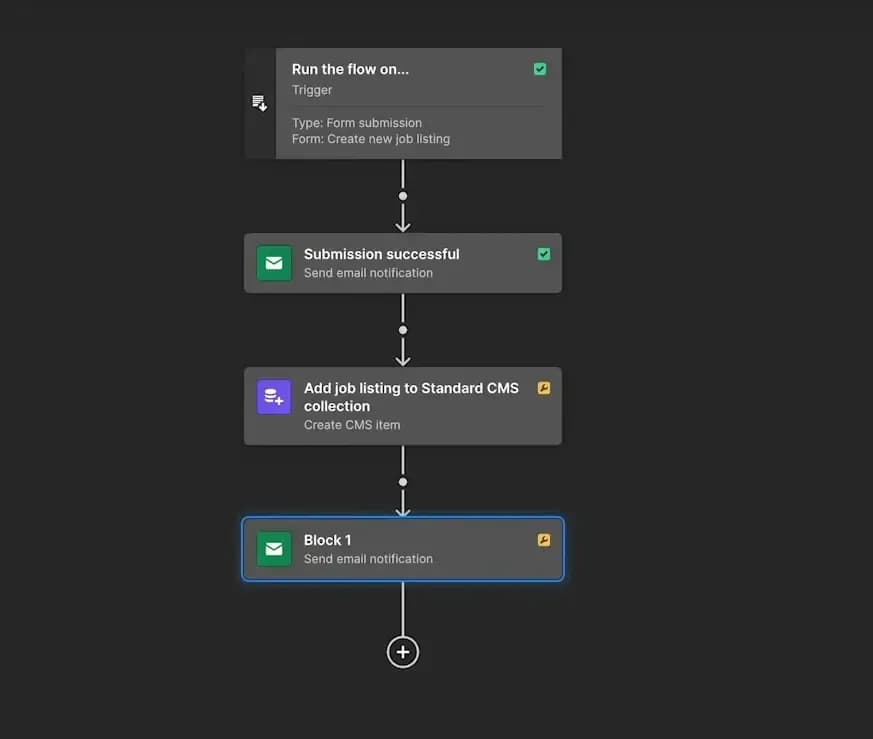
In just a few clicks, Webflow Logic lets you create highly efficient web applications. No need to connect third-party tools anymore!
Today those automations are built outside Webflow, with a dedicated tool wired to the form’s webhook. Three options, and above all three ways of billing that change the total. Zapier counts tasks, each successful action, 100 a month on the free plan and 750 on the first paid plan at $19.99 with annual billing. Make counts credits, consumed by every module executed: an eight-module scenario processing a hundred rows uses eight hundred. n8n counts executions, one per run, whatever the number of steps, from €20 a month for 2,500 executions, and nothing at all when self-hosted. For a form that qualifies leads, any of the three does what Logic promised.
Create a SaaS solution
Webflow Logic wasn’t the only new product announcement from Webflow. Webflow Membership will be a new feature that allows you to add paying users to your site to access your services.
By combining these two products, you’ll be able to create powerful SaaS solutions without writing a single line of code.
That second product met the same fate, on the same date: User Accounts, Webflow’s membership area, was removed alongside Logic on 27 June 2025. A password-protected area on a Webflow site therefore now goes through a third-party service, or through an application built elsewhere. The lesson goes beyond Webflow: a proprietary feature still in beta should not carry the core of a business model, because its disappearance is not a theoretical risk.
To develop this example, Webflow revisited its job offers app by adding a new condition: if the posted job offers a salary above a certain amount, it will appear in a premium offers list. To access it, a user must pay a subscription to your service. In just a few more clicks, Webflow has built the backbone of a new business.
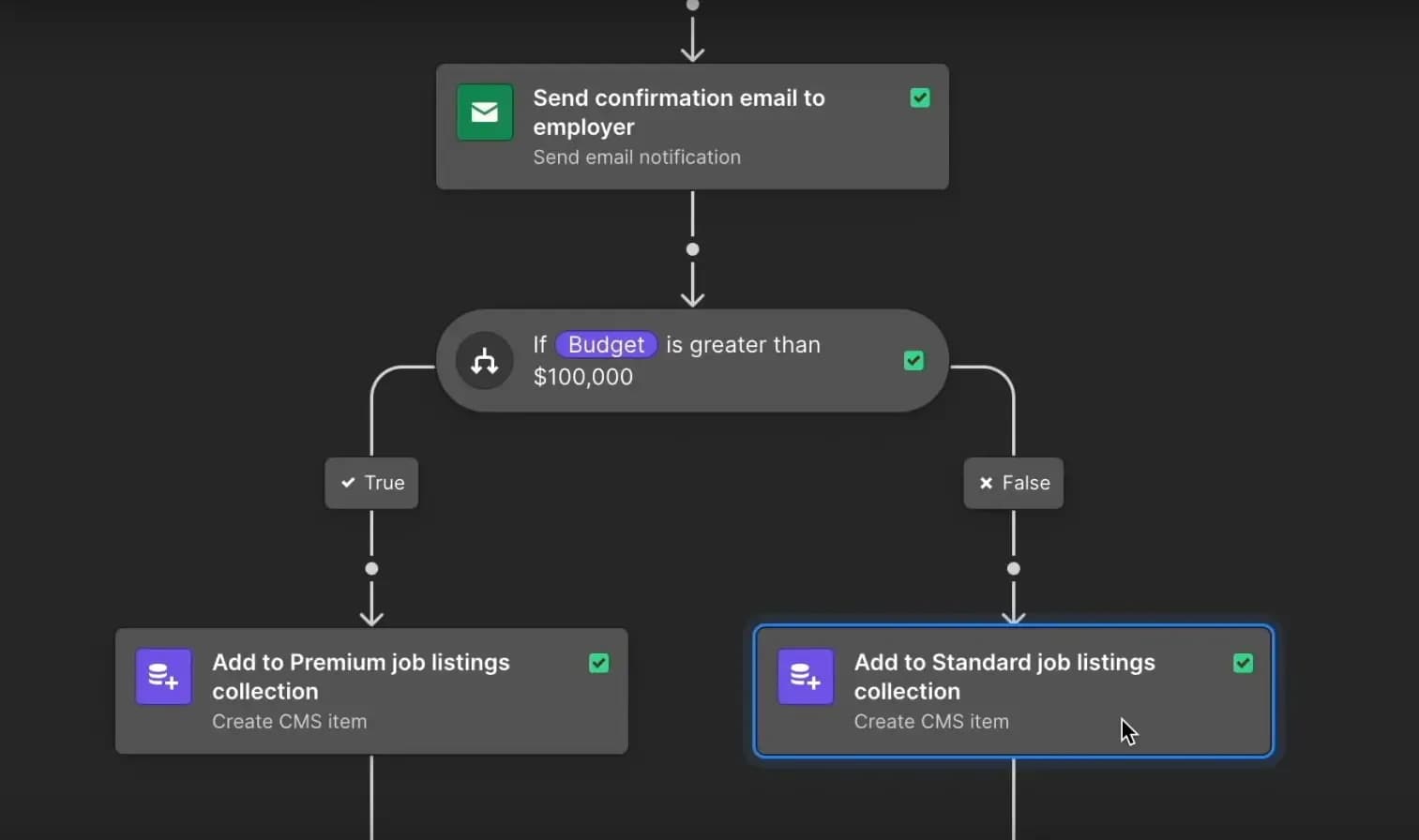
Thanks to Webflow’s new features, Logic & Membership, you’ll be able to create robust and reliable solutions without coding a single line!
Scroll, your Webflow agency
As you can see, Webflow Logic is a powerful addition to Webflow’s already comprehensive ecosystem. Of course, it’s still too early to say whether the tool is truly high-performing, but given the quality of the services Webflow usually provides, we have no doubt it will be. Over time, new features will be added to make it even more complete, potentially rivaling other solutions on the market.
If you’d like to learn more about Webflow Logic or no-code in general, feel free to reach out! Scroll is a Webflow agency specializing in no-code tools. We stay up to date with major releases like Webflow Logic to master them and offer them to our clients.
Want to build a website? An app? Automate tasks? Or do you have broader questions about no-code and web development? Don’t hesitate to contact us to discuss!
Related articles
Sep 15, 2026
Cyber Resilience Act: reporting obligations took effect on 11 September
Since 11 September 2026, manufacturers must report exploited flaws within 24 hours, including on products already sold. Who is in scope, and what to prepare.
Sep 15, 2026
Health applications: what HDS hosting really requires
The certification covers the host, not your application. The six activities, what the 2024 framework changed, and what stays on your side.
Sep 08, 2026
Digital accessibility: who is covered, and where to start
Two regimes, a decree in force since 27 August 2026, fines up to 50,000 euros. Who has to comply and where to start.