
Blog · Web development
Webflow: reviews, pricing, features… Everything you need to know about the Webflow CMS.

On this page
Have you heard of Webflow? It’s a no-code CMS. With it, you can create a website without writing a single line of code! Discover everything you need to know about this tool.
If you're interested in no-code or have looked into creating a website, you’ve probably already heard of Webflow. The platform presents itself as a next-generation CMS, allowing you to develop and design websites simply and without coding. But what is Webflow really worth?
At Scroll, we specialize in no-code tools. We’ve also built a unique offering to create design-focused sites faster and more flexibly for our clients. That’s the principle behind our Webflow agency.
Webflow is one of our main tools: we use it daily to create and improve our clients' websites. So if you want to learn more about this solution, we’ll tell you everything, no secrets: reviews, pricing, features… Discover everything you need to know about Webflow.
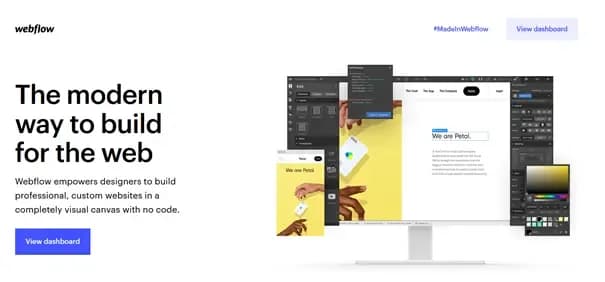
What is Webflow, the CMS that lets you create a website without coding? Scroll, no-code tool specialists, we’re big fans and we’ll tell you everything you need to know!
What is Webflow?
Webflow is a CMS (Content Management System), meaning a tool that lets you create and edit websites. The most well-known CMS on the market is probably WordPress: today, around 40% of websites run on WordPress. But other CMS platforms exist: Drupal, Magento, and Shopify are CMSs with their own specific features.
Webflow’s unique feature is that it’s a no-code CMS. In other words, a CMS that lets you create your website without writing a single line of code. Webflow is based on the “drag and drop” principle: if you want to add an element to your web page, select it from the dedicated menu and drag it directly onto the page. It’s as simple as that, the element is added to your site.
However, be aware: Webflow offers many features, some of which are quite advanced. A no-code CMS doesn’t mean anyone can pick it up and use it right away. In fact, Webflow has a real learning curve: while it’s very intuitive for those who master it, it can also be discouraging for beginners!
How does Webflow stack up as a CMS?
How does Webflow stack up as a CMS? Rather than just giving you our opinion, let’s break down together what the app has to offer its users!
Introduction to the Webflow CMS
The Webflow content editor is divided into four main sections: three columns and a top banner.
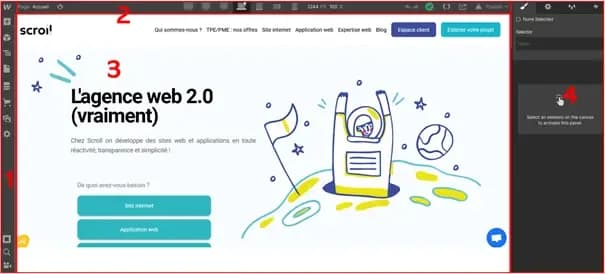
Here’s what the Webflow site editor looks like
Section (1): the left sidebar. It’s used to select elements you want to add to your page. You can drag and drop them directly into column 2 to add them to your webpage. Images, Hn tags, Call-To-Action buttons, sections, columns, lists… Webflow offers many pre-made elements that you can add with ease. As a bonus: Webflow lets you create and save your own elements, like CTAs that you can reuse across all your pages.
If you want to add e-commerce elements to your Webflow site, you’ll find them here as well.
The top banner (2) has three main functions. First, it lets you quickly select the page you’re working on. This way, you can easily switch between all the pages of your website to apply specific changes.
The second feature allows you to check that your site is fully responsive, meaning it adapts naturally to all screen types: desktop, tablet, mobile… With a single click, you can see how your website displays on each device and ensure no elements overlap or are misaligned.
Finally, the third option offered by this banner is to publish the changes you’ve made to your page (if your site is hosted directly by Webflow) or to export the page’s source code (if you host your site elsewhere).
The central column (3) in the Webflow editor is your webpage. You can add elements from column (1) by simply dragging and dropping them, then modify them in the right column (4) to give them the appearance you want. Webflow’s CMS provides a live preview of your site’s rendering. Very useful for refining design and usability!
Finally, the right column (4), as we mentioned, is used to modify specific elements. When you add an element to your webpage from column (1), it isn’t styled yet. Click on it in the central column (3): the right column (4) opens. You can then edit the selected element, size, color, shape, position, etc. Every element is fully customizable.
Other Webflow features
Beyond its editor, Webflow offers many other features that make it particularly practical if you want to create a website without coding. These include:
- The ability to host your site directly with Webflow. When you make changes to your web pages, you can publish them online without having to export your source code.
- The ability to share your projects so multiple people can access them.
- A dashboard that groups all your projects, allowing you to work on multiple sites at once.
- Very comprehensive resources to help you understand how Webflow works and learn to build sites on your own. The documentation is extensive, and Webflow even offers a "University" section to train users on its tool. These resources are currently only available in English.
- Templates are available so you don’t have to start from scratch. Pre-built sites can be reused to copy their structure or specific elements. On Webflow, you’ll find ready-to-use templates for blogs, showcase sites, or e-commerce sites to get started faster.
- The ability to follow " designers" specialized in creating Webflow websites, to draw inspiration from their work or contact them if needed.
- A very active community and a support forum to answer any questions you might have.
So it’s clear: the appeal of Webflow lies in both the tool itself, highly practical and powerful, and the community surrounding the application. Creation, inspiration, and mutual support are at the heart of the CMS’s philosophy.
Can Webflow be used to develop an e-commerce site?
A question that comes up very often concerns online stores. At a time when solutions like Shopify or Magento are growing rapidly, how does Webflow measure up for creating e-commerce sites?
More and more, Webflow offers new tools to help you launch an online store. They’ve notably developed a new product, Webflow Ecommerce, allowing you to integrate payment methods like Stripe or Google Pay directly into your site. You can also easily create product pages and checkout pages (cart, payment, thank-you, etc.). Webflow is therefore a fully suitable CMS for developing e-commerce sites. You’ll find the dedicated pricing options below.
In general, Webflow can be used to develop any type of website: showcase sites, e-commerce sites, blogs, or even more complex sites that rely on web applications.
The best Webflow templates
As we’ve mentioned: one of Webflow’s standout features, like other CMS platforms such as WordPress, is the ability to choose from pre-designed templates. If you want to create a site using Webflow, you’ll have access to a wide range of pre-built sites to save time or spark design ideas.
We’ve selected our favorite themes for you, across three categories: startups, e-commerce, and agencies.
Athena, a perfect Webflow theme for startups
Discover the theme Athena !
With an airy design and dynamic effects, Athena is an ideal template for startups. The template offers 4 different homepages to help you sell your concept to visitors. You’ll also find numerous internal pages and ready-to-use sections that you can reuse on your site.
The template is fully responsive and includes multiple forms you can integrate into your website to capture new leads.

Template price: $79 USD.
Our favorite e-commerce template on Webflow: Faraday
Faraday is a very classic yet well-crafted e-commerce website template for Webflow. The homepage allows you to showcase your flagship products or new releases, current promotions, and your brand’s latest news.
Product pages are beautifully designed with all the expected features: product photos, pricing, stock availability, and a detailed description below the fold.
The template is fully responsive and includes Global Swatch, with just a few clicks, you can change all the colors across the site to match your brand. A perfect template for launching an e-commerce website!

Template price: 79$ USD.
A Webflow template for agencies: Growth
Growth is a Webflow template designed for digital marketing agencies. It highlights your services, team, and contact forms so leads can easily reach out. It also allows you to seamlessly integrate charts and polished case studies to demonstrate your impact on clients.
The template includes no fewer than 16 page templates, such as Services, Blog Post, Case Study, and Careers, all essentials for agencies!

Template price: 79$ USD.
Discover all other Webflow templates
These are just examples! Webflow offers numerous website templates for a wide range of industries. All are customizable and typically responsive.
To explore other Webflow templates, click here.
Webflow pricing: how much does the CMS cost?
How much does a Webflow subscription cost? This is a question we’re often asked. The answer depends on what you want to do with the tool. Webflow offers several plans and pricing tiers.
There are three main types of plans: Account, Site, and E-commerce. The Account plan gives you access to Webflow’s site editor, the drag-and-drop tool for creating and editing pages. The Site plan lets you create and publish your website, hosted by Webflow. You can even purchase a custom domain directly through Webflow. Finally, the E-commerce plan allows you to build an online store with integrated payment systems, product feeds, and connections to Instagram, Facebook, and Google Shopping, among other features.
Account plan: access Webflow’s site editor
A free plan
Webflow does offer a free plan, primarily designed for discovery. If you have the time, you can try out the tool before upgrading to a paid plan.
The free plan lets you work on two different projects. You can even publish a site, hosted by Webflow under the free plan! However, it will only be a Webflow.io subdomain, not a custom domain. Additionally, your free site will be limited to a maximum of 2 pages. You also won’t be able to export the source code of your pages to upload them to another CMS.
A Lite plan, at $16 per month
The first paid plan allows you to create up to 10 projects simultaneously and host them for free on Webflow.io. With this plan, your subdomain can include up to 100 pages.
A Pro plan, at $35 per month
Webflow’s top-tier Account plan lets you develop an unlimited number of projects, export them as needed, publish them on a Webflow.io subdomain (up to 100 pages), and password-protect these subdomains.
Site plan: host your website on Webflow
Plan at $12/month
The « Basic » plan lets you publish your website, hosted by Webflow. Your site can include up to 100 pages and receive 25,000 monthly visits.
Plan at $16/month
The higher-tier plan doesn’t increase the number of pages you can host. However, it allows for up to 100,000 monthly visits. It also includes API connections and the ability to add an internal search feature for your visitors.
Plan at $36/month
The top-tier plan is ideal for high-traffic sites. You can still host up to 100 pages, but now you can receive up to 1,000,000 monthly visitors. You also get improved overall performance, whether in terms of bandwidth or API connectors.
E-commerce plans: boost your sales with Webflow
Finally, E-commerce plans allow you to sell your products directly on your Webflow site. Three plans are available.
Standard Plan: $29/month
The Standard Plan lets you add up to 500 products to your website. Webflow provides a customized checkout and a variety of payment systems. However, be aware that each transaction incurs a 2% fee on the order amount. You can sell up to $50,000 worth of goods per year.
Plus Plan: $74/month
The Plus Plan allows you to add up to 1,000 products to your catalog and removes transaction fees. You can sell up to $200,000 worth of products per year.
Advanced Plan: $212/month
The Advanced Plan is designed for high-volume e-commerce sellers. It allows you to add up to 3,000 product references to your catalog. With no transaction fees and no sales cap, this plan is only worth considering if your business is performing exceptionally well!
Additional purchases to consider
If you want to create your site with Webflow, you’ll also need to budget for a few extra expenses (common to most other CMS platforms):
- Domain name purchase from a provider. Domain prices vary but start at €8 per year.
- Template purchase. At Scroll, we develop many sites from scratch, meaning without using pre-built templates. But you can also buy one to save time!
Our take on Webflow
So, what’s our take on Webflow?
At Scroll, we chose Webflow from a myriad of CMS options for several reasons. The main one is the ability to customize sites and offer a wide range of new ideas to our clients. Webflow provides immense possibilities thanks to its flexibility, which isn’t always found in other tools. The platform is indeed very powerful, and its highly active community offers significant resources.
The other option is empowerment. Building a site on Webflow requires advanced knowledge. But thanks to its very simple content editor, we enable our clients to truly take control of their website: they can change its content very easily and at any time, without needing an external developer.
So, as you can see: our take on Webflow is that it’s probably the best no-code CMS on the market. The added bonus? Thanks to its flexibility and the lack of hard coding, Webflow allows us to create more affordable websites for our clients!
Scroll, an agency specializing in Webflow and no-code tools
But at Scroll, we’re not just Webflow specialists. We actually master the leading no-code tools on the market, such as Bubble or Airtable. This allows us to create custom web tools or applications tailored to your needs. And we can even integrate them into your website if needed!
Examples of sites built with Webflow
To show you everything we can do with Webflow, here are a few examples of sites we’ve built on this CMS.
Scroll Agency
First, our agency’s website. It was built entirely on Webflow. We didn’t use any templates: we started from scratch to showcase the full extent of our expertise.

Manuel Ravier
We redesigned the website of one of our clients, Manuel Ravier, founder of Investissement-locatif.com. The best part? Creating a site with a more refined, airy design, responsive, and improving natural SEO and conversion rates. Mission accomplished.

Discover Manuel Ravier’s website
Quentin Servet
We designed Quentin Servet’s website on Webflow. The goal: showcase his artistic creations on a site that serves as both a portfolio and a point of contact. We chose a dark design with numerous dynamic elements to reflect his work as a creator. Judge for yourself!
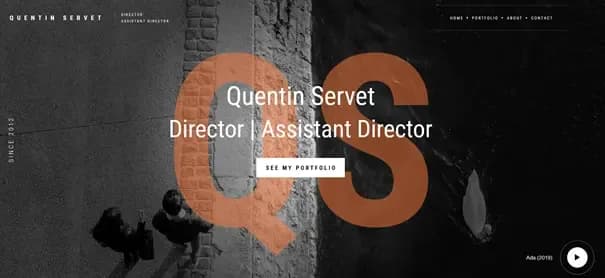
Discover Quentin Servet's website
Contact us to create your website on Webflow!
Want to create (or recreate!) your website? Feel free to reach out to discuss your project. We’d be delighted to support you and develop the new showcase for your business!
Related articles
Sep 30, 2026
Payload CMS: our review after putting it into production
Payload CMS from the inside: which projects to choose it for, how it changes marketing, what it costs, and the pitfalls of a Webflow migration
Sep 15, 2026
Cyber Resilience Act: reporting obligations took effect on 11 September
Since 11 September 2026, manufacturers must report exploited flaws within 24 hours, including on products already sold. Who is in scope, and what to prepare.
Sep 15, 2026
Health applications: what HDS hosting really requires
The certification covers the host, not your application. The six activities, what the 2024 framework changed, and what stays on your side.