
Blog · Web development
Search Console generative AI report: what it actually measures
On this page
Available to everyone since 31 August 2026, it counts your impressions in AI Overviews and AI Mode. No clicks, no queries: how to read it without going wrong.
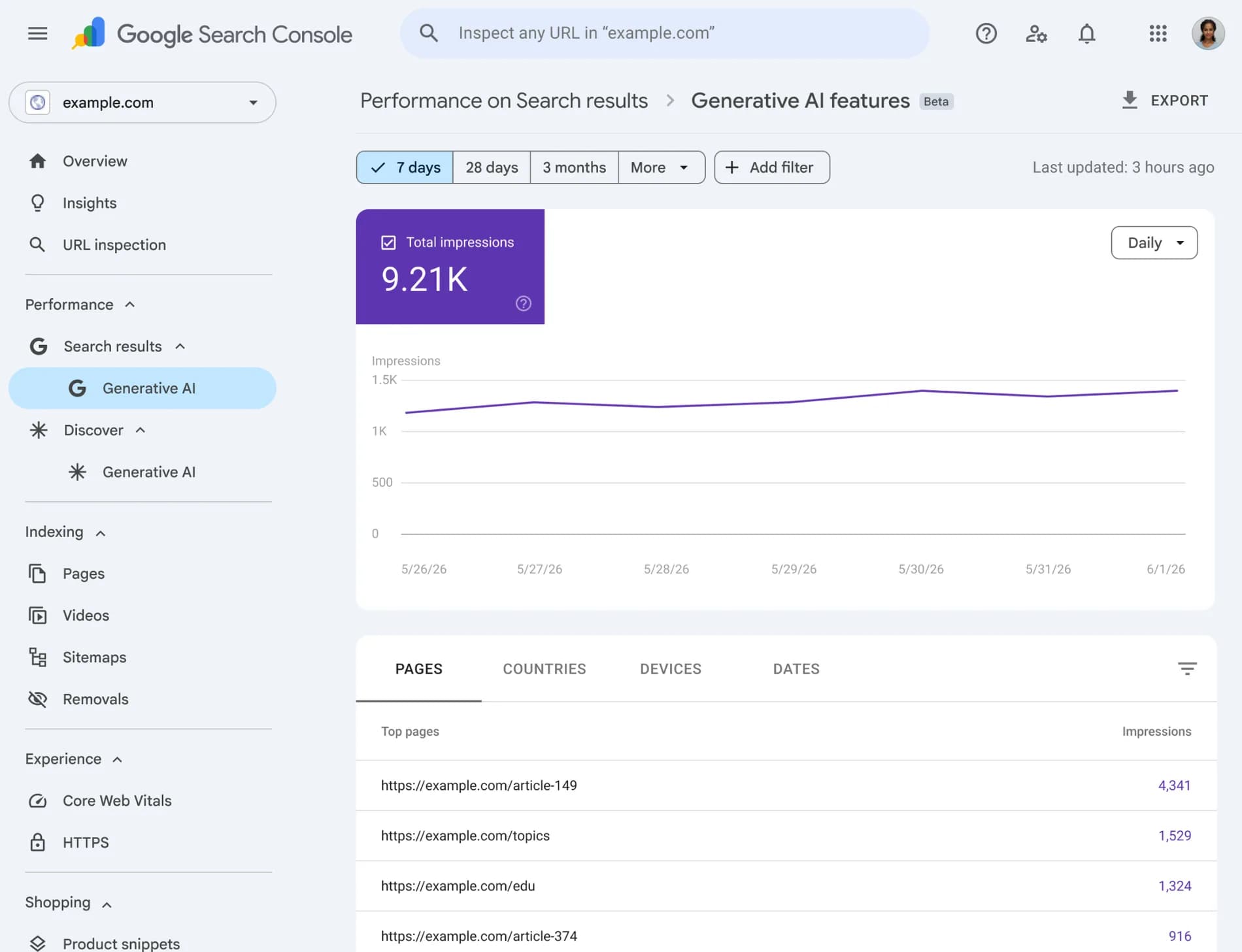
Since 31 August 2026, every site has a dedicated generative AI report in Search Console. It counts the times your links were shown in AI Overviews, in AI Mode and in Discover’s AI features.
You need to understand straight away what it is not. It gives no clicks, no click-through rate and no position. It does not let you separate AI Mode from AI Overviews. And its impressions are already counted in the classic performance report, so you must never add the two together. In other words, it answers the question “is Google citing me in its AI answers”, not the question “what is it earning me”. That is already a lot, provided you read it correctly.
What the report contains
Google announced these reports on 3 June 2026 on its Search Central blog, first for a subset of sites, then for everyone from 31 August. There are two of them, one for Search and one for Discover.
The official documentation sets out the mechanics. The single metric is the impression, defined as how many times links to your site were shown to a user in a generative AI feature on Google Search. The available dimensions are pages, countries, dates and devices, with daily, weekly or monthly granularity, in Pacific Time.
One detail few people mention: a filter distinguishes the search type between text-based and multimodal. On a site where images matter, for instance retail or real estate, that distinction is worth a look.
The data exports from the interface, chart and table included. The usual Search Console limits apply: a thousand rows per table, recent data marked as preliminary with a dotted line, and totals that can differ between chart and table depending on the aggregation mode.
Three reading mistakes to avoid
This report is new, and we already see false interpretations circulating. Three above all.
- Adding the two reports together. Impressions from AI features are included in the classic performance report, under the Web search type. Adding them means counting twice. It is the most frequent mistake, and it artificially inflates a visibility review.
- Drawing conclusions about traffic. An impression inside a generated answer says nothing about the click. The report contains no clicks, and clicks from those surfaces stay buried in the classic report with no distinct search appearance. So you cannot compute a click-through rate specific to AI surfaces.
- Blaming AI for a drop without checking. A traffic drop can come from deindexing, a redesign, a migration or seasonality. We set out that diagnostic method in our article on reading the indexing report after a traffic drop, and it remains the first thing to do before accusing generated answers.
Why the definition of an impression matters
Google counts an impression when links to your site were shown in an AI feature. That wording deserves a pause, because it covers very different realities for a reader.
A link displayed inside a generated answer can be a source cited under the text, a contextual link within the answer, or a link in a side panel. Depending on the case, the odds that a human sees it and clicks are nothing alike. The measure is therefore a presence signal, not an exposure signal, still less a signal of interest.
Practical consequence: track the trend and the relative ranking of your pages, not the absolute value. Knowing that one page is cited twice as often as another is usable. Turning an impression count into a traffic estimate is not.
What the report does not say, and how to get closer
Three blind spots limit its use, and each has an imperfect but useful workaround.
You cannot separate AI Mode from AI Overviews: the documentation includes both without distinguishing the source surface. Nothing to do on the tooling side. The workaround is to reason by query type, since AI Mode triggers on conversational, exploratory questions while AI Overviews cover a broader spectrum.
No clicks in this report: cross-reference with the classic performance report, filtered on the Web search type, comparing the same pages over the same period. If a page’s AI impressions rise while its total clicks fall, you have a usable signal. It is not proof, it is a lead.
No query dimension: the documentation lists pages, countries, dates and devices. So you know which pages are cited, not on which questions. The workable approach is to start from your most cited pages and reconstruct the intents they serve, which amounts to doing GEO backwards, starting from the result. Our article on moving from SEO to GEO describes the journey in the other direction.
If the report does not appear
Three possible reasons, in order of likelihood. Your site has not received enough impressions in AI features, which is the most common case on small sites or thinly covered sectors. Your site is excluded from those features by a preview directive, which we cover below. Or your pages are simply not indexed, which is an earlier and more serious problem.
Note too that data from Search Labs experiments is not included. What you see corresponds to features actually served to users.
The controls you have, and their trade-off
The question comes up every time: can you refuse to appear in AI answers while staying well ranked in classic results? Google’s documentation on AI features points to the usual preview directives, namely nosnippet, data-nosnippet, max-snippet and noindex.
That is where the trade-off sits, and it is less comfortable than it looks. To appear in an AI feature, a page must be indexed and eligible to show a snippet. Directives that limit the snippet therefore also limit presence in generated answers, but they equally limit your snippet in classic results, which is what makes people want to click. The documentation describes no AI-specific setting that would leave the rest untouched.
The special case of data-nosnippet is worth knowing: it applies to a portion of a page, so it can protect a specific passage, a price or a high-value answer, without sacrificing the whole page’s snippet. It is the finest tool in the set.
Google also maintains an optimisation guide for its AI features, which confirms what we see in the field: no magic tag, no dedicated file. We drew the same conclusion about llms.txt, useful to agents but with no effect on Google rankings.
How to fold it into a monthly routine
Here is the routine we set up with our clients, and it takes half an hour a month.
First, record your AI impressions, and above all the list of cited pages. That list is where the value sits: it tells you which content Google considers worth reusing in an answer, which is a far sharper editorial signal than an average position.
Then put the classic report’s clicks for the same pages over the same period next to it. You get three cases. Cited pages that keep their clicks are your assets, to reinforce. Cited pages losing their clicks are feeling the direct-answer effect, and need a reason to click, such as a tool, a calculation, a template or proprietary data. Pages never cited on subjects where you are legitimate point to a format problem rather than a substance problem.
Finally, do not change your steering indicator every quarter. Visibility in AI surfaces is a young, unstable measure, and it will stay that way as long as Google keeps adding metrics, which it explicitly says it intends to do. Keep conversions as the final judge, and treat AI impressions as a leading indicator.
And the other engines, ChatGPT, Perplexity, Copilot?
This report only covers Google. Yet a growing share of questions is asked elsewhere, and none of those assistants provides the equivalent of a Search Console. So you have to measure differently, and it can be done without exotic tooling.
The method has two parts. First, track referral traffic in your analytics: visits coming from the assistants’ domains show up like any other referring source. The volume is small, often a few percent, but its composition is interesting, because these are visitors who read an answer and still wanted to go further. Their conversion rate deserves to be looked at separately.
Second, test your own questions. Ask three or four assistants the ten questions that matter for your business, and note whether you are cited, with which page and in what terms. It is hand-crafted, it takes an hour a quarter, and it gives a picture no dashboard offers. It is what we do for our own site.
A legal point in passing: if you set up or change your analytics tool to track these sources, check that it stays within the scope of the consent exemption, otherwise you will only measure visitors who accepted the banner. We detailed those criteria in our comparison of Google Analytics alternatives.
What it changes for a content strategy
This report confirms what we have been seeing for a year: being cited and being visited are becoming two different things, and they now have to be measured separately. The editorial consequence is direct. Content that merely answers a factual question will be heavily cited and little visited, since the answer is enough. Content that brings a method, data only you hold, or a tool, remains a destination.
That is exactly the reasoning we developed in our article on AI Overviews: aim for citation on entry-level questions, and keep real reasons to visit the pages that matter commercially.
What we take away from it
The Search Console generative AI report has been available to everyone since 31 August 2026. It measures one thing, impressions in AI Overviews, AI Mode and Discover’s AI features, broken down by page, country, date and device.
It gives no clicks, no click-through rate and no queries, and it does not separate the surfaces. Its impressions are already included in the classic report, so you never add them up. Read as a presence signal and cross-referenced with the clicks of the same pages, it becomes a good leading indicator. Read as a traffic measure, it misleads.
We build this tracking into the redesigns and visibility work we run on our website and CMS projects. If you see a gap between your impressions and your clicks and want to know where it comes from, let’s talk.
Frequently asked questions
What is the Generative AI report in Search Console?
It is a dedicated report announced by Google on June 3, 2026 and rolled out to all sites worldwide by August 31, 2026. It measures impressions of your links in Google’s generative AI features, namely AI Overviews and AI Mode for Search, with an equivalent report for Discover. Available dimensions include pages, countries, dates, and devices.
Does the report provide clicks from AI Overviews?
No. The only metric in this report is impressions, defined as the number of times links to your site were shown in a generative AI feature. Clicks from these surfaces remain counted in the standard performance report under the Web search type, with no distinct appearance type. It is currently impossible to calculate a click-through rate specific to AI surfaces.
Can you separate AI Mode from AI Overviews?
No. The report includes both without allowing you to distinguish the source surface. Google’s documentation does not support this breakdown. The only workaround is to analyze by query type, as AI Mode is triggered mainly by conversational and exploratory questions.
Should you add AI impressions to those from the standard report?
No. Impressions from AI features are already included in the standard performance report under the Web search type. Adding them would mean double-counting the same displays and artificially inflating visibility metrics.
Can you opt out of AI answers without losing organic rankings?
Not cleanly. Google refers to standard preview directives: nosnippet, data-nosnippet, max-snippet, and noindex. However, a page must be indexed and snippet-eligible to appear in an AI feature, so limiting snippets also limits snippets in standard results. The data-nosnippet directive is the most precise, as it protects a portion of the page without sacrificing the entire snippet.
Read next
Guides on the same topic
Explore the topic further with a selection of complementary resources.
Nov 04, 2026
Next.js 16: what really changes, and should you migrate
Turbopack by default, explicit caching, 90% less memory in development. What Next.js 16 and 16.3 change, and what we enabled on this site.
Oct 30, 2026
Cookies: what the European omnibus would change for your banner
The Council agreed its position on 21 October 2026: audience measurement exempt from consent, data breaches at 96 hours, browser signal dropped. Nothing is law yet.
Sep 02, 2026
Google Analytics alternatives: measuring without a cookie banner
The CNIL exempts audience measurement tools that meet its criteria from consent. Google Analytics is not one of them. What that changes in practice.