
Blog · AI
Microsoft Copilot Frontier: the new features reshaping enterprise work
On this page
Microsoft Copilot is evolving from a conversational assistant to a system capable of taking action within enterprise tools. Here are the Frontier features that CIOs should be tracking.
Microsoft Copilot Frontier: the new features reshaping enterprise work
Microsoft Copilot is no longer limited to summarising meetings or drafting emails. With Frontier, Microsoft is testing a new generation of functions capable of executing tasks, using software, and coordinating multiple actions.
The Microsoft Copilot Frontier features provide a clear indication of Microsoft’s direction. The goal is no longer just to help users produce content. Copilot must be able to understand an expected outcome, organise the steps, and act within Microsoft 365.
This shift directly impacts IT managers and CIOs. It unlocks new productivity gains but also increases the need for governance, rights management, and agent control.
Important update: as of 6 August 2026, not all features under the Frontier label share the same status. Some are still experimental, while others, such as Copilot Cowork or agentic capabilities in Word, Excel, and PowerPoint, are already generally available.
What exactly is Microsoft Copilot Frontier?
Frontier is Microsoft’s early access programme for new Microsoft 365 AI features.
A registered company can test Copilot agents and experiences before their large-scale rollout. These features are identified by the “Frontier” label in Microsoft 365 Copilot. Microsoft notes that they may evolve, expand, or even be removed before general availability.
Frontier is not, therefore, a standalone new version of Copilot. It is a controlled testing environment within Microsoft 365.
For CIOs, this distinction matters. Enabling Frontier means granting access to features still under validation. Access is disabled by default and can be configured from the Microsoft 365 admin centre for a limited group of users.
The process is documented and worth understanding before committee discussion, as it is more granular than a simple toggle. Frontier is enabled at the tenant level from the Microsoft 365 admin centre, under Copilot > Settings, and access is then set in three modes: no access, the default setting, all users, or designated groups. Three prerequisites apply: an AI Admin, Security Admin, or Office Apps Admin role; Copilot licences assigned to the relevant users; and the “Microsoft-created apps and agents” permission enabled. Some agents, such as Agent 365, additionally require modern billing and acceptance of specific terms. Documentation: getting started with the Copilot Frontier programme.
Copilot Cowork turns a request into executed work
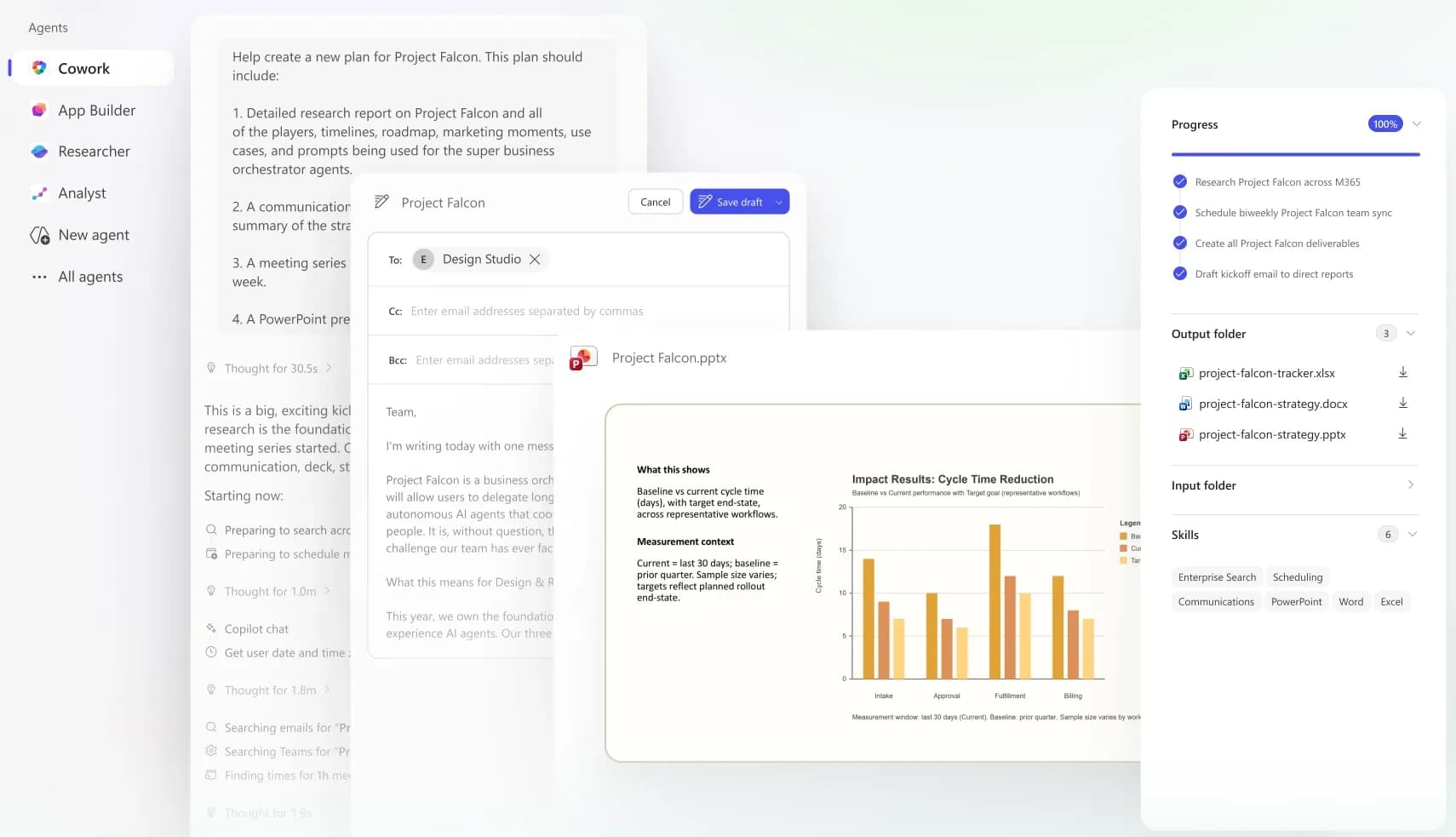
Copilot Cowork is arguably the most transformative new Microsoft Copilot feature.
A traditional assistant waits for a question and provides an answer. Cowork receives a goal and performs multiple actions to achieve it. It can search for information in Microsoft 365, create documents, send emails, post in Teams, schedule meetings, or manage a calendar.
The user describes the expected outcome. Cowork then uses accessible data in Outlook, Teams, Excel, OneDrive, or SharePoint to prepare and execute the work. Sensitive actions remain subject to validation before execution.
A request might look like this:
“Review the project meeting minutes, identify pending decisions, create an action plan, and organise a meeting with the relevant managers.”
Copilot Cowork can then retrieve documents, cross-reference exchanges, draft the agenda, identify participants, and prepare the meeting.
Cowork has been generally available since June 16, 2026 for Microsoft 365 Copilot customers. However, its operation relies on usage-based billing, calculated with Copilot Credits based on the models used, context searches, tool calls, and execution time.
This is a prerequisite, not a payment method: until usage-based billing is enabled by an administrator, users cannot access Cowork, at best, they can request access. Credits are consumed by model responses, tool calls, image generation, and navigation tasks, and caps can be set per user or group. Documentation: manage Copilot Cowork for your organization and Copilot Credits.
For an IT department, the question is no longer just about the price per user. It’s also about tracking the actual cost of long tasks and repeated processes.
Microsoft 365 agents become a new layer of the information system
The Microsoft 365 agents are specialized Copilots for a specific mission, data source, or process.
An agent can connect to a document database, SharePoint, business data, or multiple tools. It can provide answers, generate analyses, and execute processes based on granted permissions.
Microsoft already offers several built-in agents, such as Researcher for in-depth research or agents specialized in planning, surveys, and finance. Companies can also create their own agents using Copilot Studio.
This is close to how an enterprise AI agent works: the tool receives a mission, consults sources, selects actions, and uses software.
This flexibility creates a new challenge. A company can quickly accumulate dozens of agents created by business teams. Each agent may have its own connections, instructions, owners, and access rights.
Agent governance must therefore align with that of internal applications. Microsoft Agent 365 aims precisely to inventory, supervise, and secure the agents deployed in the organization. Microsoft Defender can, for example, map their identities, cloud resources, and the MCP servers they are connected to.
Microsoft’s reference framework has a name: the Copilot Control System, and it is structured around three pillars: security and governance, management controls, this is where the lifecycle of agents and connectors resides, from deployment to retirement, and measurement. The key point to verify early is both budgetary and technical: “fundamental” controls require Purview with an E3-level license, while “optimized” controls require an E5 license with Defender for Cloud Apps. Documentation: the Copilot Control System.
App Builder enables the creation of small applications directly from Copilot
Among Microsoft Copilot Frontier’s features, App Builder is one of the most accessible for business teams.
The user describes the app they need. Copilot then generates a lightweight, interactive application without requiring development skills. This app can be modified and shared with other users.
App Builder can be used to create a request tracker, a simple planning tool, a consultation interface, or a basic dashboard.
This feature can shorten the time between identifying a need and creating a first tool. However, it may also increase shadow IT if each department builds its own apps without a shared framework.
Rapid creation does not eliminate architectural considerations. It remains essential to define where data is stored, who maintains the app, how permissions are managed, and what happens when the prototype becomes business-critical.
To mitigate these risks, the IT department can rely on a shadow IT action plan and clearly distinguish between prototypes, temporary tools, and production-ready applications.
Workflows automates Microsoft 365 using natural language
The Workflows agent lets users create automations by simply describing the expected process.
Instead of configuring each step and connector, the user can say:
"When a new request arrives in this SharePoint list, create a Planner task, notify the manager in Teams, and send a confirmation email."
Workflows then generates a process using compatible Microsoft 365 services. It can operate in Outlook, SharePoint, Teams, and Planner, respond to an event, or run on a defined schedule. The workflow can then be tested and managed in a visual interface.
This approach makes automation more accessible. It does not replace process framing.
A stable, predictable, and critical workflow must remain documented and testable. An agent is more suitable when steps vary by context. The difference between the two approaches is detailed in our guide on choosing between AI agents and automation.
DLP policies configured in Power Platform also remain important. They allow control over which services can exchange data and help prevent unauthorized connections.
Copilot can now use a browser
Browser access significantly expands Microsoft AI’s scope in enterprise environments.
In Frontier, Copilot Cowork can use a local Edge browser while respecting the policies already applied to users. It can thus access web services and perform steps that lack direct Microsoft 365 integration.
The documentation specifies the exact scope of this capability, and it is more reassuring than intuition might suggest. The tab runs on the user’s machine, with their already open sessions: it therefore inherits conditional access, DLP rules, and Edge browsing policies from the tenant. A “Cowork Browsing” setting enables or disables the feature for the entire organization, allow/block lists continue to apply, and each browsing task is logged in the unified audit journal. Reference: browser usage governance.
Researcher with Computer Use offers a different approach. The agent interacts with websites, applications, and tools in a secure virtual environment. It can navigate, log into a service, and collect data as part of a research task.
This capability automates tasks that previously required human intervention: searching for information on a portal, consulting multiple interfaces, or retrieving data from a legacy application.
It also increases risks. An agent with a browser can access sensitive information, enter data into a form, or trigger an external action. Permissions, accessible domains, validations, and logging must be defined before any large-scale deployment.
Word, Excel, and PowerPoint enter agentic mode
Copilot can now perform multi-step actions directly in Word, Excel, and PowerPoint.
In Word, it can create, restructure, and improve a document while referencing other files. In Excel, it can analyze data, build calculation logic, and evolve the workbook. In PowerPoint, it can produce and refine a full presentation from an objective and multiple sources.
This marks a significant shift from earlier Copilot versions. The AI no longer just suggests a paragraph or an isolated formula. It can plan the work, execute multiple changes, and improve the result within the application. These features have been generally available since April 2026.
This reduces the need to switch between Copilot Chat and Office tools. The user stays in their document, spreadsheet, or presentation.
For IT departments, the quality of results will depend on the quality of internal data and models. A poorly structured file or outdated documentation will still produce fragile results.
Outlook goes beyond email summarization
Copilot in Outlook is also becoming more autonomous.
It can sort messages, highlight important topics, manage certain calendar conflicts, and help users track requests that require a response. The goal is to handle a continuous part of inbox and calendar management, rather than just responding to one-off requests.
This evolution can deliver real benefits to employees managing high email volumes. However, it requires careful attention to automatic actions, retention rules, and access to shared mailboxes.
What IT departments should prepare now
The new Microsoft Copilot features show a clear trend: Microsoft 365 is becoming an execution platform for AI agents.
The priority is not to enable all features. It is to select a few useful use cases, with identified data, a business owner, and an acceptable risk level.
An initial pilot can focus on a simple internal process, such as preparing a committee meeting, processing a request, or creating a report. Results should be measured before broader deployment.
IT departments should also maintain a registry of agents, generated applications, and workflows. Each element must have an owner, an access scope, a control procedure, and a deprecation rule.
This approach aligns with best practices for abusiness process automationproject: start with the need, limit the scope, and industrialize only what delivers measurable value.
Toward a business where AI truly acts
Microsoft Copilot Frontier features mark the shift from an AI that advises to an AI that executes.
Copilot Cowork delegates long tasks. Microsoft 365 agents specialize. App Builder generates applications. Workflows builds automations. The browser opens access to web tools. Word, Excel, PowerPoint, and Outlook become agentic work environments.
For IT managers and CIOs, the potential is significant. But value won’t come from the technical activation of Copilot. It will come from selecting the right processes, ensuring data quality, and implementing governance tailored to agents.
Scroll supports companies looking to frame their AI use cases, automate processes, or integrate agents into their information systems. The goal isn’t to add another layer of tools. It’s to build reliable, maintainable, and genuinely useful solutions for teams.
Frequently asked questions
What is Microsoft Copilot Frontier?
Microsoft Copilot Frontier is an early access programme for new Microsoft 365 Copilot features. It allows businesses to test agents, automations, and experimental functions before their general release. Access can be restricted to specific user groups via the Microsoft 365 admin centre.
What are the main Microsoft Copilot Frontier features?
The main Microsoft Copilot Frontier features include Copilot Cowork, Microsoft 365 agents, application creation with App Builder, workflow execution, browser use, and agentic functions in Word, Excel, PowerPoint, and Outlook. Copilot can thus perform multiple actions based on an objective, rather than just answering a question.
Is Microsoft Copilot Frontier suitable for SMEs?
Microsoft Copilot Frontier can be relevant for SMEs already using Microsoft 365 and looking to automate internal tasks. However, it is advisable to start with a limited scope, clear access rights, a business owner, and performance indicators. This approach allows businesses to test Microsoft AI without multiplying risks related to data, costs, and shadow IT.
Related articles
Nov 02, 2026
AI Act: the first harmonised standard is published, high risk delayed
EN 18286 was published in the Official Journal on 14 October 2026, and high-risk obligations are pushed to December 2027. What it changes for your AI projects.
Sep 22, 2026
Jev: the AI model that decides instead of writing
Launched in September 2026 by TypeSafe AI, Jev does not generate text: it returns typed, calibrated decisions. What it is, what it costs, and three use cases.
Sep 07, 2026
How much does an AI project cost, from POC to production?
The model price is not the point. Where the budget actually goes, how to calculate the API versus dedicated server threshold, and what makes it slip.