
Blog · AI
Open WebUI: the self-hosted interface for your LLMs
On this page
The open-source, self-hosted interface that brings the ChatGPT experience to your own models, local or cloud, with built-in RAG, under your control.
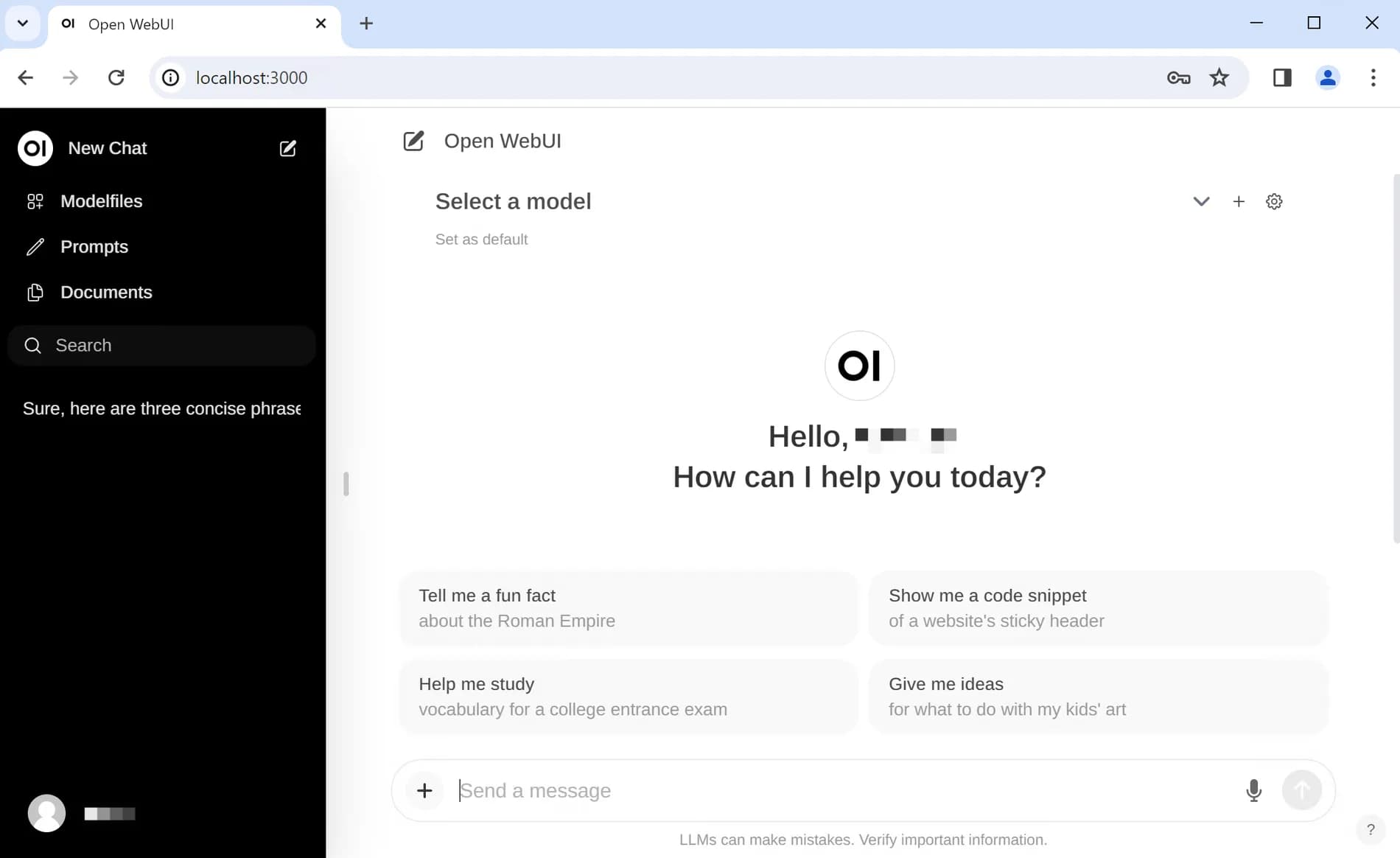
Everyone is now familiar with ChatGPT’s interface: an input field, a conversation thread, responses in Markdown. But as soon as an organization wants to retain control over its data, privacy, sovereignty, GDPR compliance, sending every exchange to a third-party service becomes a real issue. Open WebUI directly addresses this need. It’s the open-source, self-hosted interface that delivers a ChatGPT-like experience, but on top of your own models, whether they run locally or behind an API of your choosing. Here’s what it concretely offers, and when it makes sense to use it.
What is Open WebUI?
Open WebUI is a self-hosted, open-source, and extensible AI platform designed to operate entirely offline if needed. Born in the Ollama ecosystem (it was originally called “Ollama WebUI”), it has evolved into a full-featured, provider-agnostic interface. In practice, it connects to:
- local models, served by Ollama or an inference engine like vLLM;
- any OpenAI-compatible API, Mistral, OpenAI, Groq, and most cloud providers.
The result: a single interface for all your models, hosted on your own infrastructure, with no reliance on a closed SaaS or exposure of your prompts to third parties.
One licensing point is worth knowing before any white-label deployment, because it is invisible in daily use. Open WebUI ships under a BSD-style licence with an additional clause: it is forbidden to remove, obscure or replace the "Open WebUI" branding, name, logo, visual identifiers, except in three cases. The first is a numeric threshold: deployments whose end users do not exceed fifty people in any rolling thirty-day period. The other two are written permission from the vendor, or an enterprise licence. For an internal SME deployment, no constraint; for a white-label platform resold to clients, the question arises at the fifty-first user. Text: the Open WebUI licence.
A ChatGPT experience, but on your own terms
The interface adopts all the conventions your teams are already familiar with: conversation threads, Markdown rendering, code block syntax highlighting, exchange history, and multimodal support (images, file attachments, voice depending on configuration). The key difference can be summed up in one sentence: the data never leaves your infrastructure. Open WebUI is natively multi-user, with accounts, groups, and granular permission management, you deploy the tool for an entire team, not just a single workstation. During a conversation, you can switch models, compare responses from two models side by side, or reserve certain models for specific use cases. For end users, adoption is immediate: it’s “the in-house ChatGPT.”
Built-in RAG: converse with your documents
One of Open WebUI’s major strengths is its RAG (Retrieval-Augmented Generation) is natively integrated, with no add-ons required. Upload documents (PDFs, Word files, web pages…), and the tool splits, indexes, and enables the model to respond based on your content rather than its general knowledge alone, with source citations. Open WebUI supports multiple vector databases and extraction engines, giving you the flexibility to choose the architecture based on your scale and constraints; a trade-off we explore in detail in pgvector or Qdrant. For an organization, this is the most direct gateway to AI assistants connected to your data: technical documentation, internal procedures, business knowledge bases, customer support. Everything remains queryable in natural language, without anything leaving your perimeter. One key consideration: response quality depends as much on the model as on document preparation. Proper chunking, clean metadata, and up-to-date sources often make more of a difference than a more powerful model fed poorly, this is the engineering work behind a RAG that truly "works".
Two clarifications stop this building block being oversold. First, RAG does not remove errors, it makes them verifiable: Vectara's public leaderboard still measures, in its 11 May 2026 update, between 1.8% and 6% hallucinations on the most favourable task there is, summarising a supplied document. Which is exactly why source citations are not decoration. Second, indexing a document means extending it a form of trust: content uploaded by a third party can carry instructions aimed at the model, known as indirect prompt injection, the first category of the OWASP Top 10 for LLM applications. References: the Hallucination Leaderboard and OWASP LLM01.
Tools, functions, and pipelines: Python extensibility
Open WebUI is not limited to chat. It provides built-in features that the model can choose to call itself, agent-style:
- web search and URL content retrieval;
- image generation;
- code interpreter, executed in an isolated environment;
- persistent memory across conversations.
Beyond these building blocks, you can write your own tools and functions in Python to connect your business APIs, and use Pipelines: a plugin framework, independent of the interface, that orchestrates modular processing and offloads heavy tasks to a dedicated service. This is what transforms Open WebUI from a simple chat frontend into a true platform that can be extended, following a logic similar to that of the Model Context Protocol to cleanly connect AI to your tools.
Local and cloud, in the same interface
The real comfort of Open WebUI lies in the ability to mix models based on the current need. For sovereign use or high volume, we connect self-hosted open-source models via Ollama, or vLLM in production, a topic we cover in hosting an open-source LLM. To benefit from the latest models without managing GPUs, we use an API: Mistral, hosted in Europe for sovereignty, or OpenAI for raw performance. The choice is made on a per-use basis, sovereignty, model quality, actual cost at scale, and everything coexists in the same interface, with the same knowledge bases and the same tools.
Designed for teams
While many interfaces remain single-user, Open WebUI clearly targets organizational deployment: role management (RBAC), single sign-on (SSO), automated account provisioning (SCIM 2.0), shared discussion spaces, collaborative notes, and automations. An administrator retains control over who accesses which models and which knowledge bases, and can track usage. This is what makes it a serious candidate for standardizing AI access within a company, rather than allowing unmanaged individual subscriptions to multiply, that shadow AI which evades the IT department and scatters sensitive data.
Open WebUI vs. ChatGPT Enterprise and closed interfaces
Why choose Open WebUI over a turnkey solution like ChatGPT Enterprise or a proprietary AI suite? The answer comes down to three words: control, openness, cost. With a closed solution, you rent access to a single model, and your data passes through the provider’s infrastructure. With Open WebUI, you retain full control over the entire stack: the model (local or cloud, and interchangeable), hosting, data, and integrations. The tool is open source, auditable, with no per-user licensing, and a free community edition. The trade-off is that you handle operations: it’s the classic balance between the simplicity of SaaS and the control of a sovereign solution, the same choice we face when selecting a model in Mistral vs OpenAI.
Deploying Open WebUI: easy to launch, harder to production-ready
Technically, starting Open WebUI is straightforward: a Docker container is all you need to get a working instance up in minutes, locally or on a server. This ease of deployment is one of the reasons for its rapid adoption. Moving from prototype to production use, however, requires more care: selecting and sizing the model, choosing a vector database suited to your document volume, backup strategy, authentication tied to your directory, monitoring, and updates. The main cost factor depends on the setup: a GPU to size if you’re serving models locally, or API usage fees if you’re using the cloud. Nothing insurmountable, but these details separate a demo that impresses from a tool teams rely on daily, reliable, secure, and maintainable over time.
Between that instance and production, however, sits a short but non-negotiable list: HTTPS and a domain name, volume persistence, otherwise history and indexed documents vanish on the first restart, backups, authentication wired to your directory, and above all explicit control over who can create tools or functions in Python executed server-side. That last capability is what makes the platform extensible; it is also the most security-sensitive. The official documentation covers startup and options: the Open WebUI documentation.
When to adopt Open WebUI, and when not to
Open WebUI is the right choice in several scenarios:
- you have a confidentiality or sovereignty constraint on your data;
- you want to offer a ChatGPT-like experience on top of models that you control;
- you deploy AI for an entire team, with RAG on your internal documents;
- you want to consolidate scattered AI use cases under a single interface.
That said, for strictly individual use with no data constraints, a consumer subscription is easier to implement. Above all, keep this in mind: Open WebUI is an interface, not a model. Behind it, you still need a model (local or via API) and, for production use, proper engineering for RAG, security, hosting, and integration with your information system.
Properly deploying Open WebUI, model selection, RAG on your content, security, and SI integration, is exactly the kind of project we scope and operate. Thinking of a sovereign AI assistant for your teams? Let’s talk.
Related articles
Sep 07, 2026
How much does an AI project cost, from POC to production?
The model price is not the point. Where the budget actually goes, how to calculate the API versus dedicated server threshold, and what makes it slip.
Aug 28, 2026
AI Act: what actually applies since 2 August 2026
The Digital Omnibus pushed high-risk obligations to December 2027. What already applies, what was postponed, and what to do in between.
Aug 27, 2026
OpenRouter: one API for 417 AI models
A single gateway to hundreds of models, at the provider’s own rate and with no logging by default. What it changes, and where its limits are.